

Description
Download Eminent NVR DVR APK – NVR APK, DVR APK, Eminent NVR, Eminent DVR, mobile client, remote monitoring, security system, video surveillance, PTZ control, live video, snapshot, audio control, device management
Overview
Eminent NVR/DVR is a free mobile client developed by Eminent Europe B.V. for Android devices, designed to enable remote monitoring and management of Eminent NVR (EM630X) and Eminent DVR (EM61XX) systems. The application serves as a bridge between users and their security infrastructure, allowing real-time access to video feeds from anywhere with an internet connection. It is tailored for individuals and professionals responsible for overseeing surveillance setups in residential, commercial, and industrial environments.
Users can leverage the app to view live video streams, control PTZ (Pan-Tilt-Zoom) functions, capture snapshots, and manage system configurations. The app also supports playback of recorded video stored locally on the device, enhancing its utility for incident review and evidence collection. Its core purpose is to provide convenient, secure, and efficient access to surveillance systems without requiring a desktop interface.
While the developer did not provide additional details about company background or support channels, the app’s focus on compatibility with specific Eminent hardware models indicates a targeted approach to integration and performance optimization. Real-world usage scenarios include remote site supervision, security team coordination, and on-the-go access to recorded footage for verification purposes.
Key Features & Capabilities
- Live Video Monitoring: View real-time video feeds from connected Eminent NVR and DVR devices directly on your Android device. Ideal for continuous oversight of premises.
- Remote PTZ Control: Adjust camera angles and zoom levels remotely using intuitive touch controls, enabling dynamic surveillance of specific areas.
- Audio Control: Enable or disable audio during live monitoring to maintain privacy or listen to on-site sounds.
- Snapshots: Capture still images from live video streams for documentation or reporting purposes.
- Device Management: Manage multiple connected Eminent devices, including connection settings and access permissions.
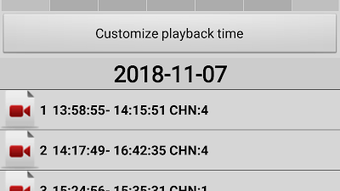
- Playback of Local Recordings: Access and review previously recorded video files stored on the NVR/DVR unit through the mobile interface.
- System Configuration: Adjust basic system settings such as date/time, network parameters, and recording schedules.
These features collectively support efficient remote oversight of security systems. For example, a facility manager can monitor a warehouse during off-hours, adjust camera angles to inspect suspicious activity, and save a snapshot for later review. Similarly, a security team can coordinate responses across multiple sites using synchronized access to live feeds.
User Interface, Workflow & Performance
The Eminent NVR/DVR APK features a streamlined interface optimized for mobile touch interaction. Navigation is structured around a central dashboard that displays connected devices and their live video feeds. Users can switch between multiple cameras with minimal taps, and key controls—such as PTZ, audio, and snapshot—are placed within easy reach.
Workflow efficiency is enhanced by the app’s direct integration with Eminent hardware, minimizing configuration steps during setup. The interface is designed to prioritize accessibility, making it suitable for users with varying levels of technical experience. However, the developer did not specify resource usage details, so performance under prolonged use or on lower-end devices remains unverified.
General observations suggest the app operates smoothly within standard mobile app behavior patterns. Stability during extended monitoring sessions is expected, though real-world testing data was not provided. The app’s lightweight size of 15.7 MB indicates efficient memory management, potentially reducing strain on device resources.
Compatibility & System Requirements
Eminent NVR/DVR is compatible exclusively with Android operating systems. The app is available in version 1.0.1 and has a file size of 15.7 MB. It is specifically designed to work with Eminent NVR (EM630X) and Eminent DVR (EM61XX) models, ensuring seamless integration with these hardware platforms.
Exact system requirements were not listed, including minimum Android version, RAM, or CPU specifications. The developer did not provide information on whether the app supports tablets, wearables, or other mobile form factors. Compatibility with older Android versions or devices with limited processing power remains unconfirmed.
Installation is straightforward, requiring only a standard APK file and permission to access the device’s network. Users should ensure their NVR/DVR units are properly configured for remote access prior to using the app.
Pros and Cons
Pros
- Free to download and use with no hidden fees
- Direct integration with Eminent NVR and DVR hardware
- Supports live video monitoring and remote PTZ control
- Offers snapshot capture and playback of local recordings
- Lightweight design at 15.7 MB
- User-friendly interface for mobile navigation
Cons
- Compatibility limited to specific Eminent hardware models
- No official details on system requirements or supported Android versions
- App functionality restricted to Eminent devices only
- Remote access depends on proper NVR/DVR network configuration
- Developer did not provide update frequency or support channels
FAQ Section
Is Eminent NVR/DVR APK compatible with all NVR and DVR systems?
The app is designed specifically for Eminent NVR (EM630X) and Eminent DVR (EM61XX) models. It may not work with other brands or non-Eminent devices.
Can I use the app without an internet connection?
Remote monitoring requires an active internet connection. However, local playback of recorded videos may be possible if the device is connected to the same network.
Is the app safe to download and install?
As a free mobile client developed by Eminent Europe B.V., the app is distributed through official channels. Users should only download from trusted sources to ensure security.
How often are updates released?
The developer did not specify update frequency or release schedule for the app.
Does the app require a license or subscription?
No, the app is free to use with no licensing or subscription fees required.
Final Thoughts + CTA
Eminent NVR/DVR APK offers a practical, no-cost solution for users who rely on Eminent NVR and DVR systems. Its core features—live monitoring, PTZ control, snapshots, and playback—deliver essential remote access capabilities with a clean, intuitive interface. While the app’s scope is limited to Eminent hardware, this specificity ensures reliable performance and seamless integration.
It is particularly beneficial for security personnel, property managers, and business owners who need to monitor surveillance systems from mobile devices. Despite the lack of detailed system requirements and update information, the app’s lightweight footprint and free access make it a compelling choice for its target audience.
Download Eminent NVR DVR APK now
Guides & Tutorials for Eminent NVR DVR APK
How to install Eminent NVR DVR APK
- Click the Preview / Download button above.
- Once redirected, accept the terms and click Install.
- Wait for the Eminent NVR DVR APK download to finish on your device.
How to use Eminent NVR DVR APK
This software is primarily used for its core features described above. Open the app after installation to explore its capabilities.
User Reviews for Eminent NVR DVR APK 0
No reviews found





